

This month’s update is headlined by our official n8n integration, which allows you to build custom, no-code automations. We are also introducing “Predicting Ambiguity” to our AI Pipeline to prevent translation errors before they happen, and launching the Corporate Translation Portal to give your entire organization a secure way to get translations that don’t require high-quality standards instantly.
From expanding our game localization tools for Xbox and Epic Games to rebuilding our Google Drive integration for enterprise-grade security, here is everything we’ve released this January.
Crowdin Receives Official n8n Integration
We’re releasing an official Crowdin node for n8n. Unlike most iPaaS, the Crowdin n8n node supports nearly all Crowdin API endpoints. Because Crowdin allows you to perform most UI actions via the API, that means the small automation you were thinking of is now probably possible, and you can do it yourself.
We decided to invest in the n8n node for multiple reasons.
- First, n8n is open source, secure, well-tested in production, and fairly priced when you do not deploy it locally but use their cloud instance.
- n8n is quite flexible as well; while it’s built to let you construct workflows yourself, they recently trained an AI to build them for you, so you can just describe the need and get the automation.
- Also, n8n allows you to build fully no-code automations, but when you feel one small thing would take lots of mouse clicks, you can have a custom code block and put a few line javascript (or AI can generate that code for you).
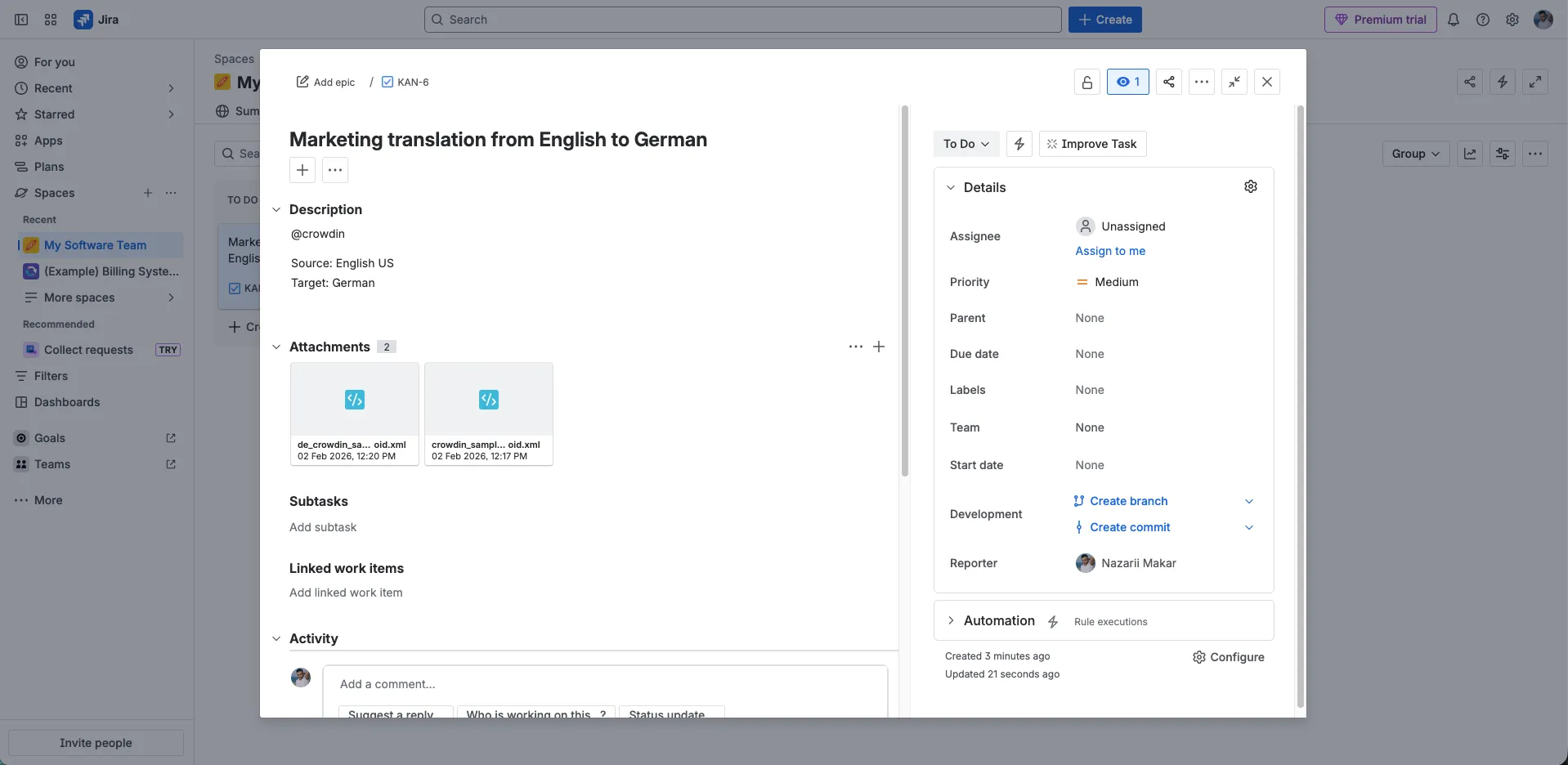
We’ve found that n8n becomes handy in quite a few automation scenarios. For instance, many of our clients have asked for easier ways for their teams to request translations directly from task managers like JIRA/Linear/Asana/Trello.
The problem is that in JIRA, we won’t have the necessary input fields (without extensive configuration), e.g., the source language and target languages for files that need translation (or require extra communication between the requester and the localization manager). We’ve found that n8n workflows can handle this quite well.
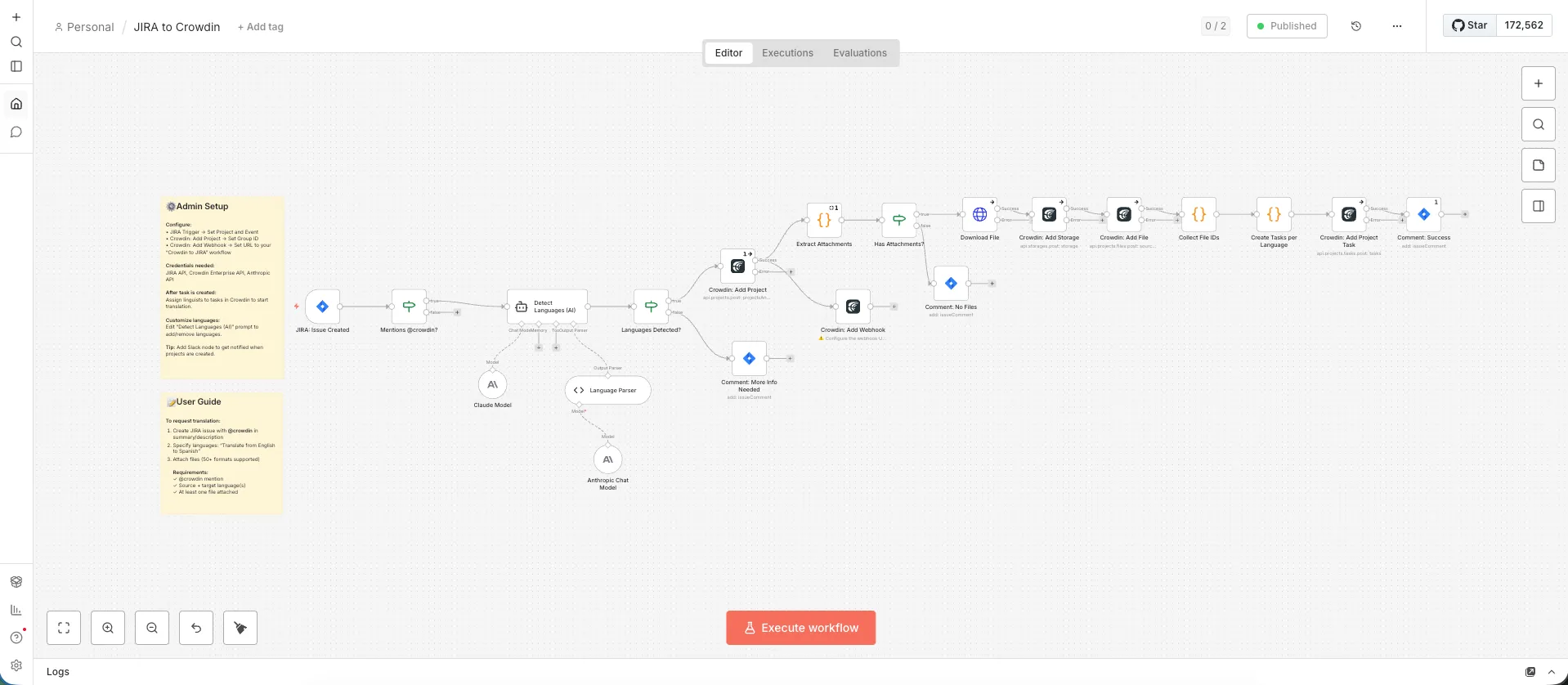
Here’s how it works:
- 8n listens for new Jira tasks.
- It filters for tasks mentioning @crowdin.
- An AI node extracts metadata (languages, deadlines, context) from the task description.
- n8n grabs the attachments, creates a Crowdin project, and uploads the files.
- Once translated, n8n automatically posts the files back to the original ticket.
The beauty is in the variability – you can:
- add Slack or Teams notifications,
- auto-assign linguists,
- set deadlines from free-form text,
- auto-close JIRA issues when done.
n8n lets you assemble these blocks however you need.
We are happy to see how many great companies build their n8n nodes. For example, Plunet is releasing its n8n connector. If you’re a language service provider, gluing Crowdin and Plunet together should be easier than ever.
A Note on Architecture
While we are working on our native Crowdin Automator for core localization workflows, we see n8n as a powerful addition for “glue” logic and agile scripting.
However, a few tips regarding custom automations in general. We encourage you to build automations that are helpful, while keeping your core processes as stable as possible.
While iPaaS offers agility, its deployment outside of core IT frameworks presents specific operational risks regarding long-term stability and system integrity:
- Fragility: It often lacks proper error recovery (if an automation fails halfway, it can leave your data in a corrupted state).
- Lack of Governance: There are rarely proper QA tools, unit tests, or code reviews to guarantee reliability.
- Maintenance: Visual workflows often lack documentation and become “tribal knowledge”—understandable only to the person who built them.
Use n8n to move fast and connect tools, but rely on Crowdin’s native features for your core localization stability. If there’s a CMS or content repository Crowdin does not connect with yet, please let us know — we are always happy to invest in building new native integrations.
The Crowdin node supports hundreds of app integrations, meaning you can build automations around almost any content repository. To give you an idea of how smooth this can look:
- A new survey is added to SurveyMonkey.
- Slack pings the manager.
- The manager simply tells the n8n bot: “Let’s translate this,” and the process begins.
A Pragmatic Approach to AI Quality: Predicting Ambiguity
Spotting very bad translations is definitely possible with QE (e.g., using vector embeddings), but for high-quality translations generated by an AI Pipeline, we see a more efficient mechanism: Input Analysis. Instead of guessing if a translation is bad after the fact, we try to predict if a source string is likely to result in a bad translation before we even try.
The problem we’re solving is not new: a lack of context or linguistic ambiguity, for example
-
Gender Ambiguity: Translating “I’m a student” into German is a gamble without knowing the speaker’s gender.
-
Homonyms: Without context, the word “Post” could mean mail, a blog entry, or a fence pole.
Our goal is to eliminate guesswork. We don’t want to force the AI to return a translation when there are several options. Instead of just ‘flipping a coin,’ the system flags these ambiguous strings. This allows a manager to step in and add the missing context in bulk, so the AI Pipeline can then finish the job with total accuracy. The AI Pipeline is already proving its value in production. One of our large enterprise customers recently reached a a 92% ‘perfect’ rate, where translations were approved without any human editing.
It’s a strong result, but we are looking for ways to get as close to 100% as possible. We believe it’s better to catch potential issues early. If the AI is likely to get it wrong due to a lack of context, the system flags it immediately. This allows you to add the missing information – like screenshots or descriptions – before the translation happens. By focusing on Input Analysis, we make sure the AI only proceeds when it’s set up for success, preventing errors instead of fixing them later.
The Solution: “Skip Ambiguous Texts.”
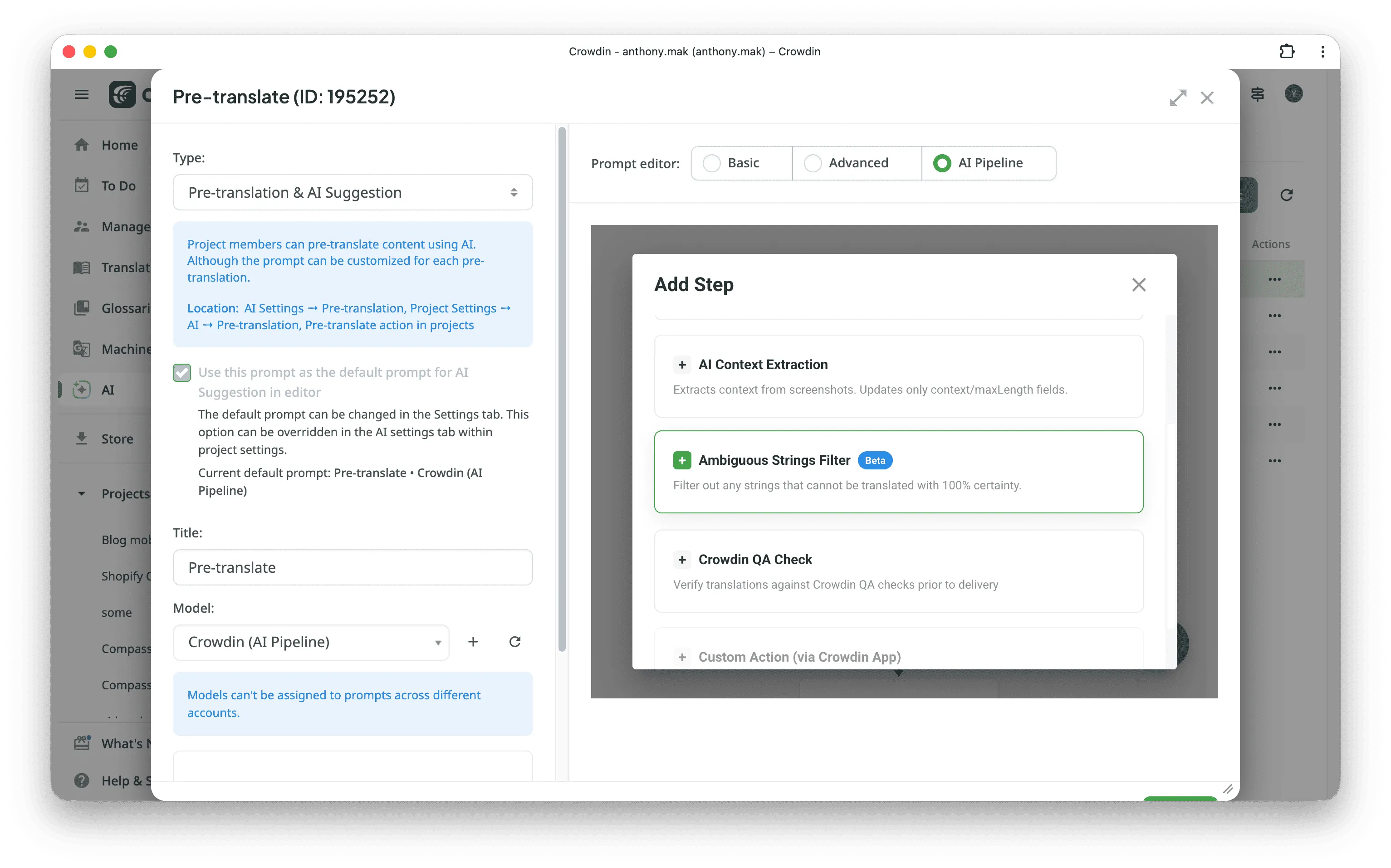
This month, we are releasing a new logic block for the AI Pipeline: Skip Ambiguous Texts.
The philosophy is simple: Prevention is better than correction. Instead of generating a translation and hoping for the best, this step analyzes the source text for linguistic ambiguity. If the text relies heavily on missing context , the AI skips it entirely.
The Recommended Workflow: We suggest using this block to filter your content. Let the AI handle the 80% of unambiguous text. For the remaining 20% — the ambiguous strings — route them to human linguists (potentially assisted by Agentic AI). A human translator looking at a video game’s dialogue is more likely to know whether “you” refers to a single character or a group; a machine might not have that information in the translation request.
We understand that skipping translations without a clear reason in the UI might feel unusual. That’s why we are already experimenting with the next step.
Imagine the AI processing a large project, such as video game dialogue. It might identify hundreds of strings in which the speaker’s gender or plurality is unclear. Instead of reviewing every line, the AI analyzes them, summarizes the missing context, and asks only the minimum number of questions to achieve perfect translation.
Our vision for the ideal future is: If the AI finds that it cannot translate, say, 20% of a project with high confidence, it proactively asks the manager for help. It might suggest:
- Answering a few key summary questions.
- Asking the team to add more context to fill in the missing data.
- Uploading specific screenshots for the flagged scenes.
Once that gap is filled, the AI can finish the entire job with extremely high expected quality.
Note: For now, strings skipped by the AI Pipeline can be found in the AI Pipeline Log (under the Tools tab).
Localize your product with Crowdin
Corporate Translation Portal
There are many instant translation websites, and LLMs can now deliver translations quite well, too. Still, we believe there is a need for the new tool we’re releasing this month. The corporate translation portal. We believe it’s a good tool for cases when you need translation quickly and don’t require guaranteed quality. “Good enough” quality is enough.
Features the Translation Portal offers:
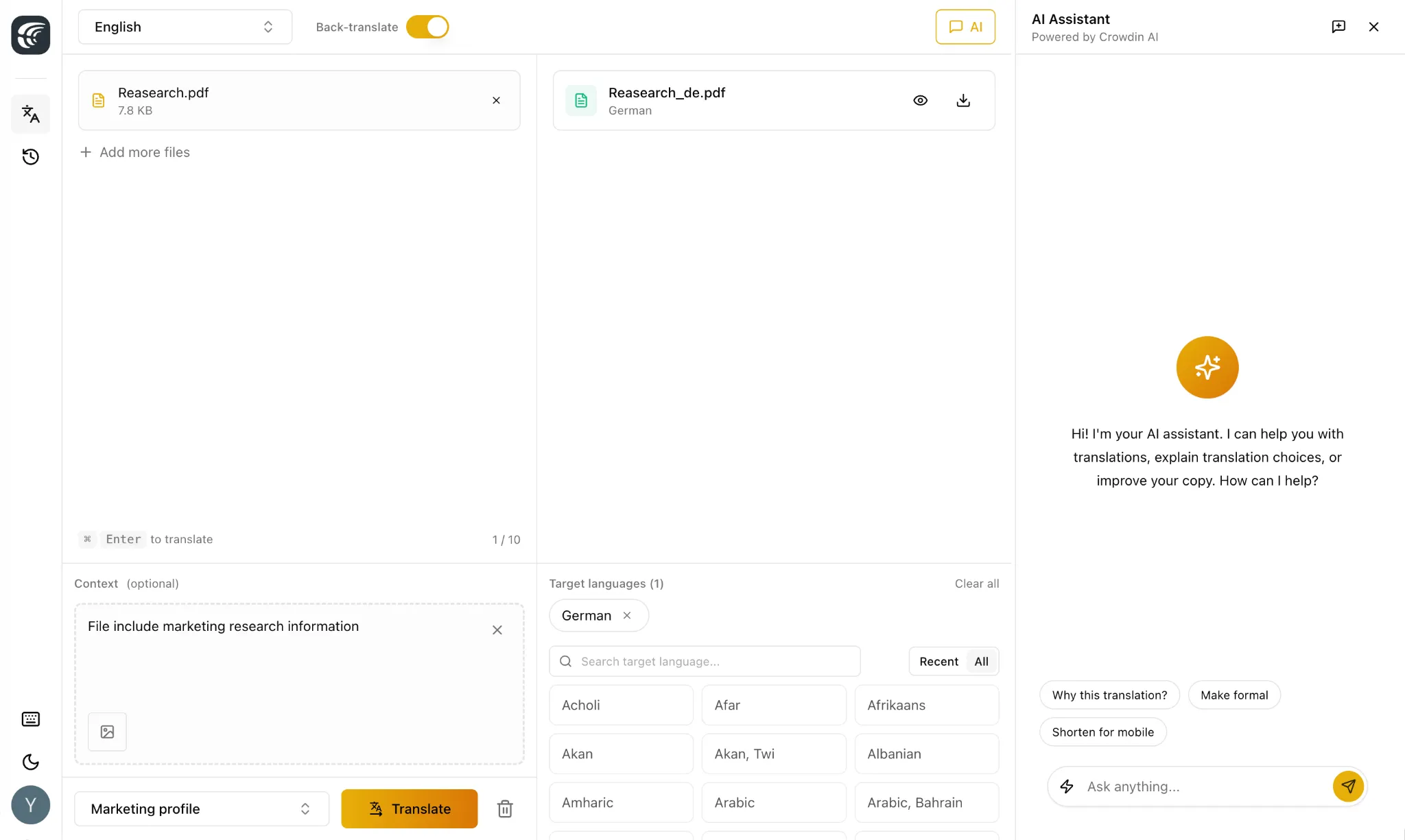
- Users in your organization can instantly translate text and files.
- Only users from your organization can log in (users would need a Crowdin Enterprise account, but would not need a license for Crowdin Enterprise, and would not have access to your Crowdin Enterprise resources unless you grant them more access).
- It has a history of translation requests.
- Crowdin Enterprise manager can define the context of your organization, define the way translations should be produced (if it’s AI Pipeline, then define steps AI should take to guarantee quality, e.g., follow certain styleguides, adhere to your corporate glossary, control hallucinations in a few steps).
So, how is it different from most mainstream solutions:
-
It has built-in “Backtranslation”. We’ve found this very powerful feature. For example, when a contract is translated for a notary, a small glitch like a broken list can change the whole legal meaning. A lawyer who doesn’t know the language wouldn’t be able to spot this. Backtranslation lets them see exactly what the translation says in English (or any other lawyer’s native language). This way, they can double-check the sense and fix any mistakes immediately.
-
Users can attach context when requesting translations. e.g. screenshots
-
The translation portal is capable of translating into multiple target languages (and back-translating from each of them)
We plan to invest more in this app. The nearest new addition would be the “Writing section”, where users from your organization would be able to use your corporate AI providers along with content resources your organization manages in Crowdin, like glossaries and style guides to create a copy that follows your content policies.
Expanding Game Localization Support: Storefronts and Achievements
Localization in game development does not stop after localizing the game itself. While Crowdin integrates with Unity and Unreal Engine and handles in-game assets perfectly, shipping a title also requires localizing the “meta” layer — specifically, the store presence and small things like player achievements.
We have added four new solutions to the Crowdin Store to address the proprietary formats used by Xbox (Xbox Live Service Config, Microsoft Store) and Epic Games (Epic Games Storefront Localization and Epic Games Achievements).
For Achievements and Stats
Translating achievements often lacks context when done in raw spreadsheets. A “locked” description needs a different tone than an “unlocked” one, or the character limits are strict. We released two new apps to handle this:
- Xbox Live Service Config: Parses the native Xbox XML format for Achievements, Rich Presence, and Stats.
- Epic Games Achievements: Handles the specific CSV structure for Epic’s achievement system.
Both apps act as custom file format processors. Instead of asking translators to produce literal translations for texts, these apps provide a WYSIWYG preview, displaying achievements in the visual layout similar to the production appearance.
For Store Listings
Marketing copy on the storefront is often the first thing a player sees, but exporting store formats can be difficult to manage. The CSVs exported by the Epic Games Store and the Microsoft Store (for Xbox/PC) use complex multilingual column structures with requirements that can be managed in Crowdin.
We have published two technical guides detailing exactly how to configure Crowdin’s CSV parser for these files. These guides Epic Games Store and the Microsoft Store (for Xbox/PC) cover:
- Mapping source/target columns to preserve the file structure for re-import.
- Enabling content segmentation so translators work on sentences rather than large blocks of HTML or description text.
Website Redesign
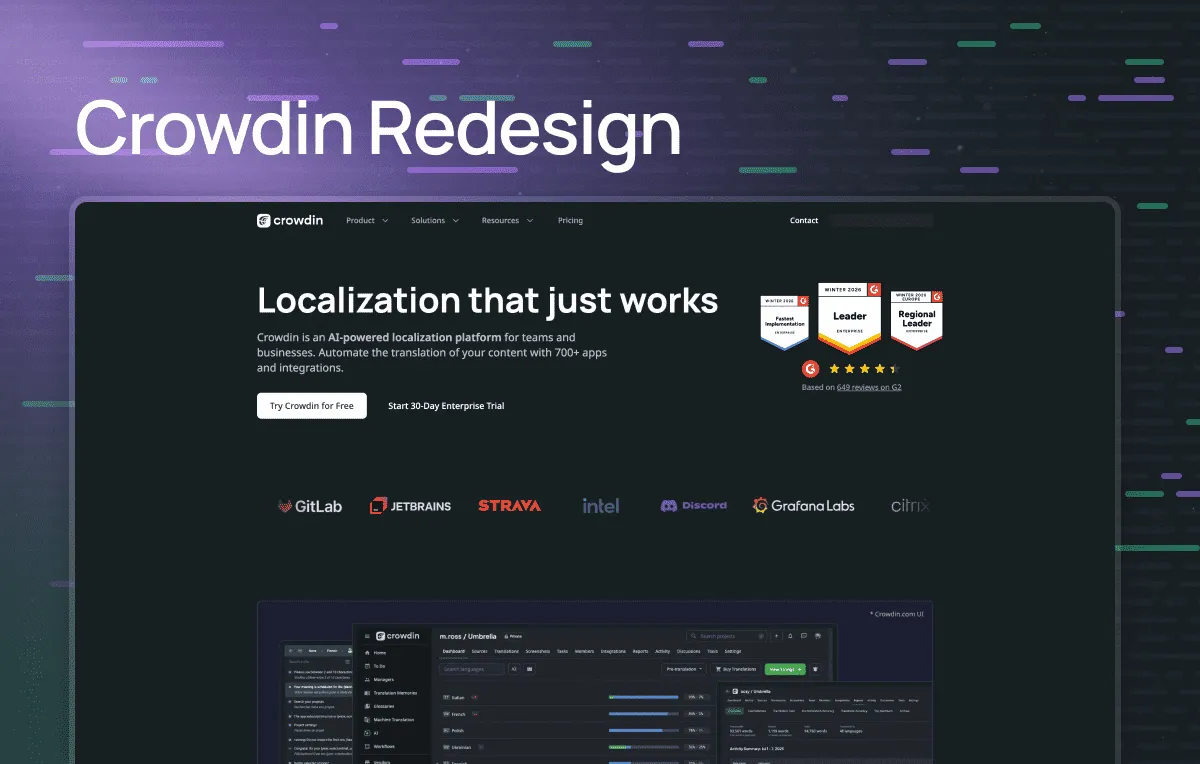
You might have noticed our refreshed website launch today! Feel free to jump over and check out the redesign for yourself.
Enterprise Security: Session Lifetime
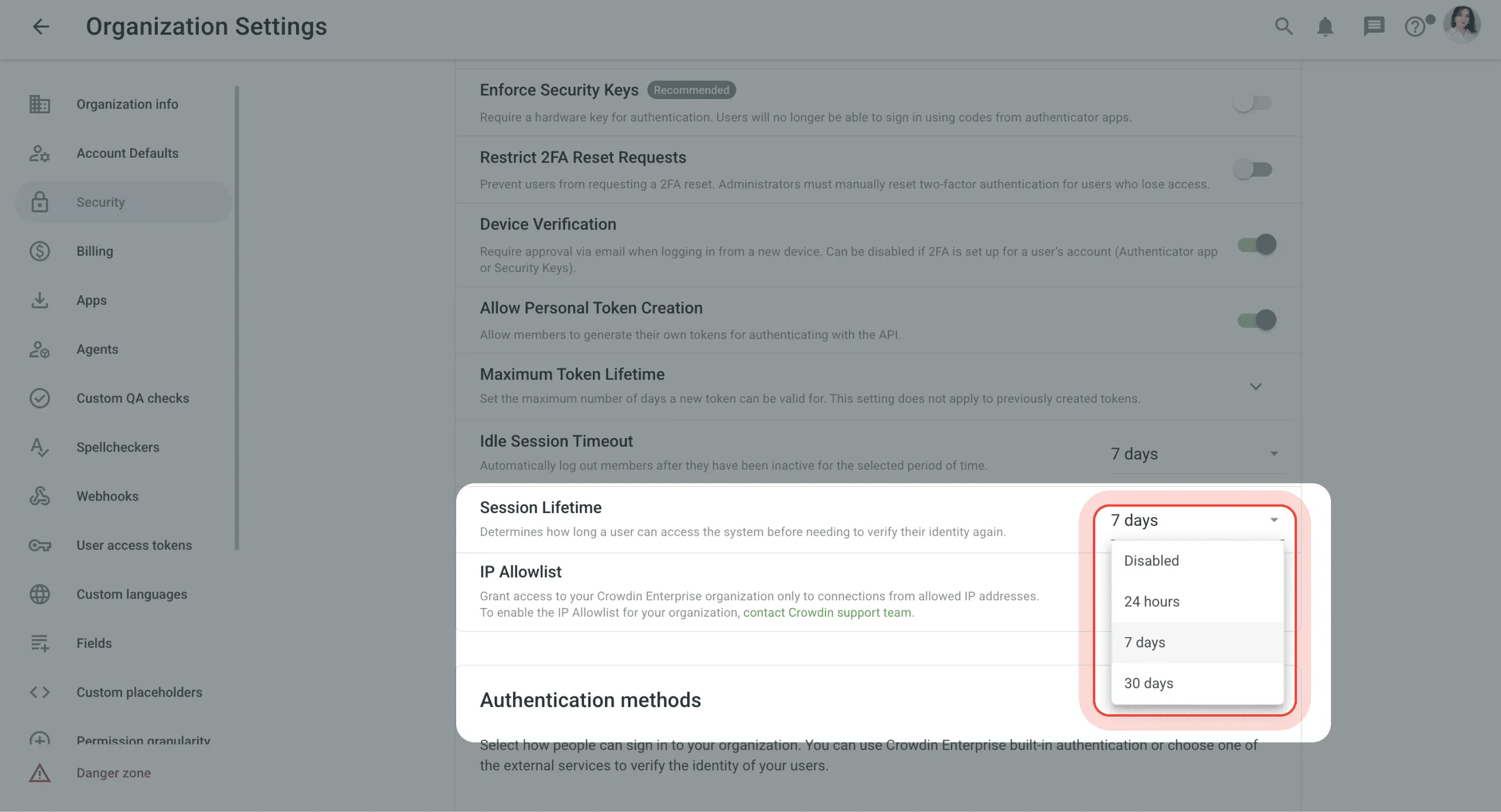
Last month, we introduced the Auth Guard API module, which lets security apps perform additional checks (like verifying allowed endpoints when users log in). However, there was a logical gap: those checks only ran at login.
We already had an Idle Session Timeout setting that logs users out after a period of inactivity, but a user could theoretically keep their session alive indefinitely by staying active — bypassing recurring verification. Today, we’re releasing a new setting: Session Lifetime. It determines how long a user can access the system before needing to verify their identity again, regardless of activity. When the session expires, the user must re-authenticate, triggering Auth Guard and all configured security checks. If you’re familiar with enterprise identity providers like Okta or Azure AD, you’ll recognize this pattern — Idle Timeout and Session Lifetime work together to give you complete control over session security.
Track and Manage QA Progress in Real-Time
We’ve resolved the issue where linguists and managers remained unaware when QA checks were still processing or failed to trigger. You can now see the exact number of strings under validation on dashboards and identify them in the Editor via a new “QA check in progress” label and filter.
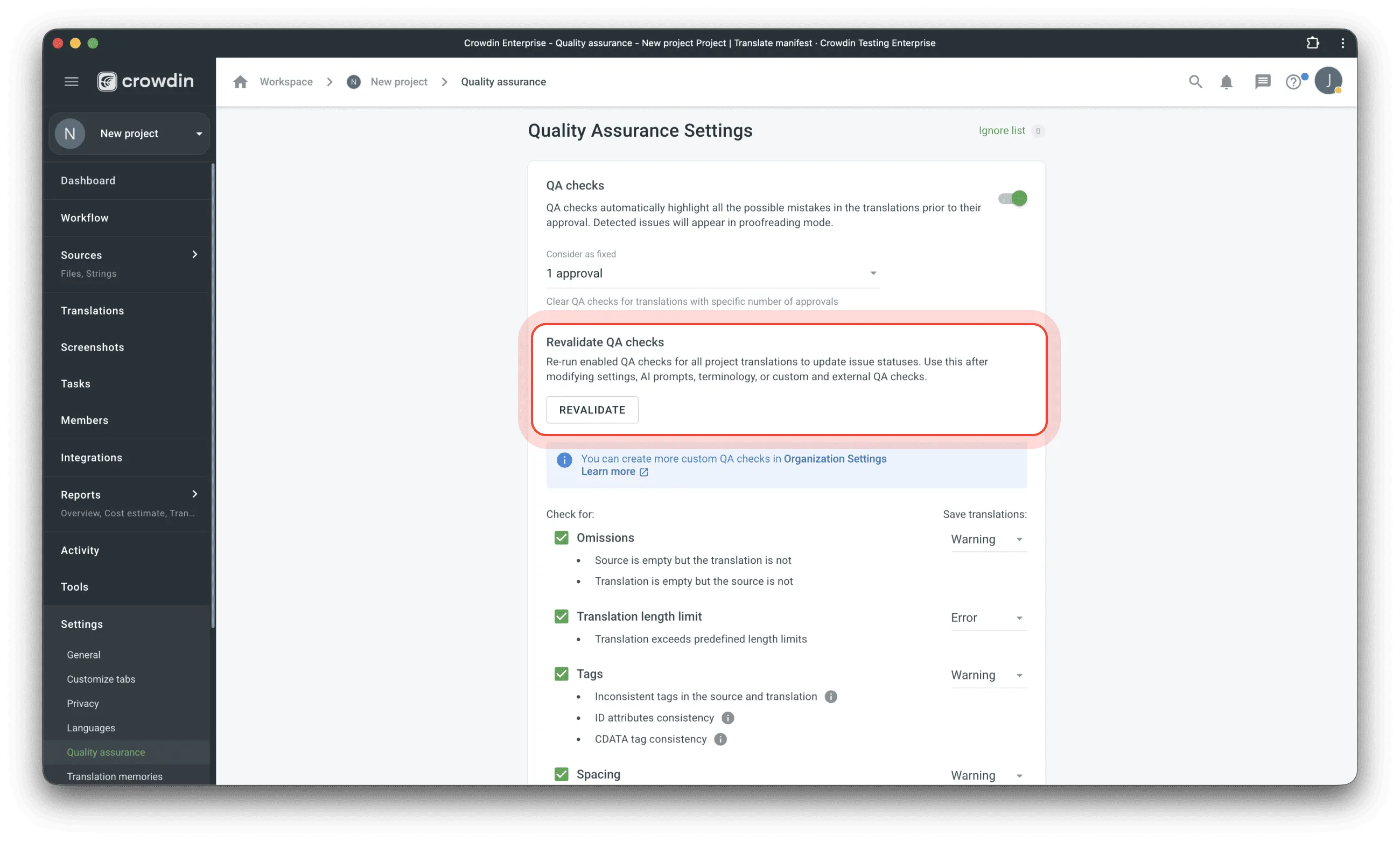
Managers can now manually trigger or cancel a “Revalidate” process in Project Settings for Terminology, AI-powered, Custom, and External checks. To support this, we’ve added three new API endpoints, Webhook events for completed revalidations, and a specific “Qa Check Status” token scope.
Google Drive Integration (Rebuilt)
We’ve rebuilt the Google Drive integration with security as the primary design principle. The previous version required full access to your entire Google Drive. The new one uses a service account with no access by default — you explicitly share specific folders with it.
How it works:
1. Add Crowdin’s service account to your Shared Drive with Content Manager access 2. Create a folder for files you want translated 3. Paste the folder URL in Crowdin
Crowdin can only access folders explicitly shared with the service account — the rest of your drive remains invisible. We recommend sharing individual folders rather than the entire Shared Drive.
This also creates a simple workflow for requesting translations: anyone in your organization can share a folder with the service account and send the URL to the localization manager — no Crowdin access needed.
From the previous integration we learned that different teams have different preferences for organizing translated files. The new integration supports multiple strategies: translations can be sorted into language subdirectories, or translated files can live alongside source files with modified names like [fr] Report.docx or Report_fr.docx. Auto-sync is available — new files in connected folders can be automatically sent for translation. The integration supports Google Docs, Sheets, Slides, PDFs, and plain files like JSON, TXT, SRT.
Note: This integration requires Google Workspace with Shared Drives. Personal Google Drive is not supported.
Chameleon.io Integration
We’re releasing a new Crowdin integration for Chameleon.io, the product adoption platform. The app lets you import, translate, and export Chameleon’s YAML localization files directly in Crowdin. It supports all experience types — Tours, Tooltips, Embeddables, Microsurveys, and Launchers — automatically extracting translatable text fields while preserving your original YAML formatting and comments.
Localize your product with Crowdin
New Alchemer Integration
We’ve had many requests for this. One of our clients has 1,500 surveys in Alchemer, and they told us that manual CSV exports were a huge headache. It was slow and impossible to track what had already been translated.
This month, we’re launching a new Alchemer integration to fix that. It connects Alchemer directly to Crowdin, so you can automate translations and send them back without any copy-pasting.
The app is free while in Beta. If you start using it now, it will stay free for you forever, even if it becomes a paid app later.
Bundles and Over-the-Air Content Delivery Sections Redesign
Here’s what’s new:
- Renamed Sections: The Bundles section is now called Downloads, and Over-the-Air Content Delivery has been renamed to CDN Distributions.
- Pre-defined Settings: By default, all files are exported in their original format for all languages in a ZIP archive, matching a standard product build.
- Flexible File Selection: You can now select files for export using simple checkboxes in addition to file patterns.
- File Formats: We now support both original and custom file formats. Note: If you choose a custom format, providing an export pattern is still required.
- Bulk Actions: To save you time, we’ve added bulk actions to both the Bundles and Distributions lists.
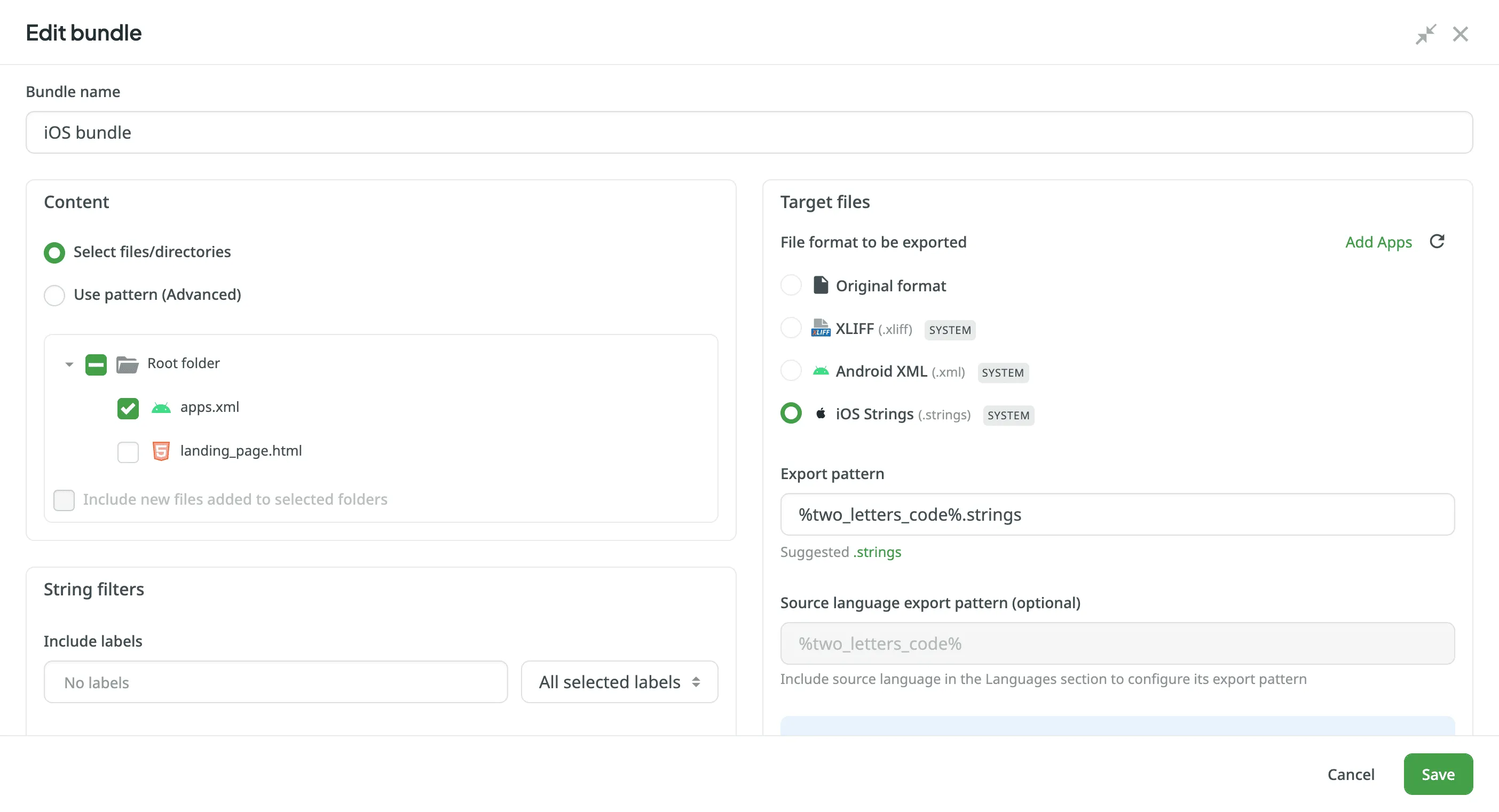
The updated bundle list now indicates which bundles are delivered via CDN, with a direct link to the corresponding distribution. All new distributions are now created from Bundles (the “create from files” option has been removed from the UI and deprecated in the API).
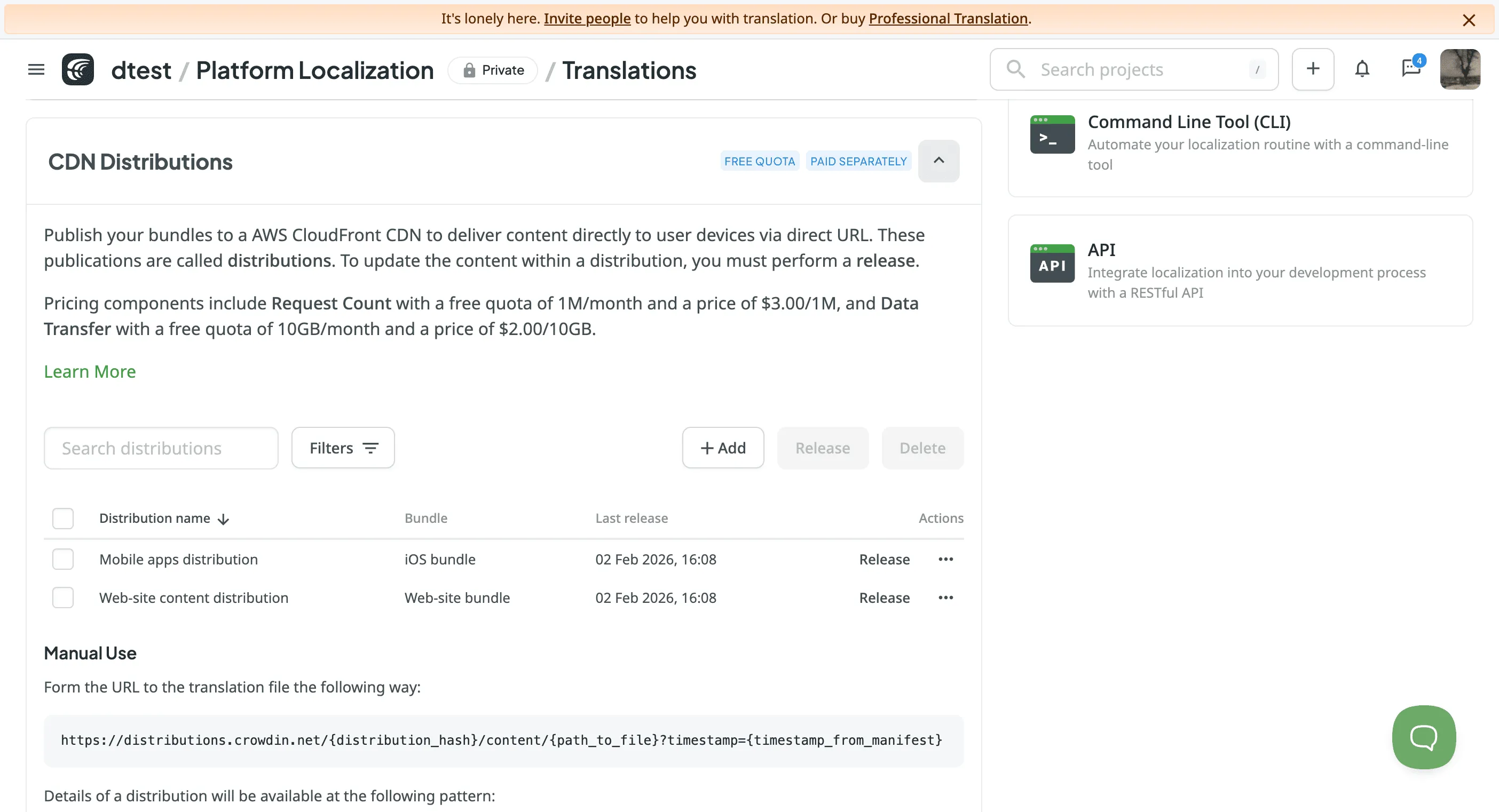
P.S: All existing distributions will continue to work correctly without any changes required on your part.
Task Finance and Automated Cost Reporting
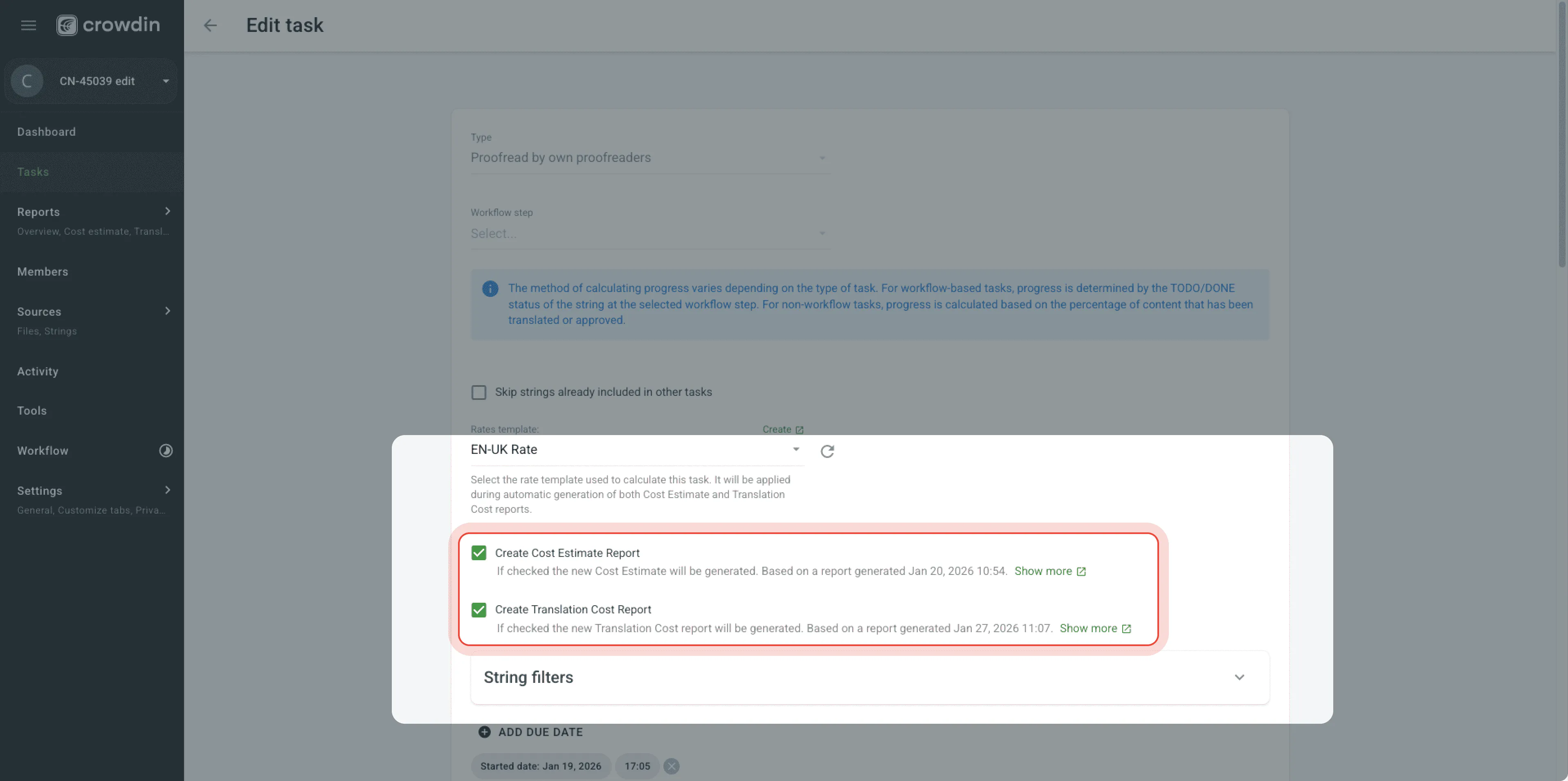
We’ve added a new Finance section to tasks, allowing those with permission to track Estimated and Actual costs at a glance. To automate your workflow, Estimate reports are generated instantly upon creation, and Actual Cost reports can be triggered automatically when a task is moved to Done.
Other Product Updates
- [Crowdin Enterprise] Translation Savings report is now available on the organization level.
- [Crowdin Enterprise] New payload parameters added to Webhook Events (Custom Step) to track what action actually provoked the workflow status recalculation.
- [String-based projects] Now we log all strings deleted via “Cleanup mode” in the Activity Log to make them traceable and easier to recover if needed.
- We’ve added the ability to search for strings by their Custom Field values using Croql. This works in both the Editor and via API, giving you more ways to filter and find exactly what you need based on your own custom data.
- Added a “Reset to Default” button in the Editor settings to restore the original app sorting on the right panel of Editor.
- Expanded Glossary search to include Definition and Subject fields, making all concept metadata searchable.
- Improvement (more details) of the logs in the Website Translator app.
- You can now use special characters (like ç, é, à) in custom language names by separating the Display Name from the Technical Name. This allows your UI to show authentic, localized titles while keeping file exports safe and compatible with all operating systems.
- We’ve updated the API v2 documentation to clearly specify which token scopes are required for each request. Now, you can easily identify the exact permissions needed to authorize your API calls.
Localize your product with Crowdin
New Podcast Episodes This Month
We’ve had some fantastic conversations on the Agile Localization Podcast lately. This month, we dived deep into scaling localization strategies with two experts:
- Agile Localization with Anna Barcons Folguera: We discussed how to bridge the gap between development and localization teams to build a truly global product experience. Listen here.
- Insights from Martina Russo: A deep dive into the nuances of language, cultural adaptation, and how to maintain brand voice while going global. Listen here.
External Tools
This month, we released new versions of:
- Flutter SDK 1.0.0,(The Crowdin Flutter SDK is out of beta and now in stable release!), 1.1.0
- CLI 4.13.0
- GitHub Action v2.14.0
- JS API Client 1.52.0
- Crowdin Plugin for Figma versions 96, 97, 98
Localize your product with Crowdin

Diana Voroniak
Diana Voroniak is a localization marketing professional with a background as a translator. She led the marketing team at Crowdin, driving growth through content, SEO, partnerships, and international events. She celebrates milestones, redesigns platforms, and spoils her dog and cat.